
When it’s the time to plug cables on the back of your TV, computer, or monitor, you have fewer options, and almost all of them are bothersome. The choices that you have are minimal, and the chances are that you are going to end up hurting yourself.
The methods that you use up to today
The most obvious options that you will have for plugging in things to the back of your TV, computer are such that you will blindly try to locate the spot. There are very fewer chances that you will plug the right cable into the correct port. You will end up wasting your so much time this way. Or worse, you will fix the wire into the wrong spot and wonder why your device is not working properly. You might just fumble with your handles blindly this way and get no results in return.
Another old technique
- Another thing that you might be trying is to fix the wires onto the back of your devices by bending head over the monitor. You might be doing this to get a clear look at the backside of your device. But the more chances are that you will only bump your head into the wall or the screen. It will take a lot of time and energy. There are also high chances that you will only hurt yourself in the end and get nowhere.
- One more technique that you might be trying at your home is that you might pull the whole thing. By doing this way, you have to move the device away from the wall completely. It has many drawbacks, such as you may damage the corners of the TV or monitor. You may end up hurting yourself in the process and break down your device in the worst scenario.
Life saviour hack
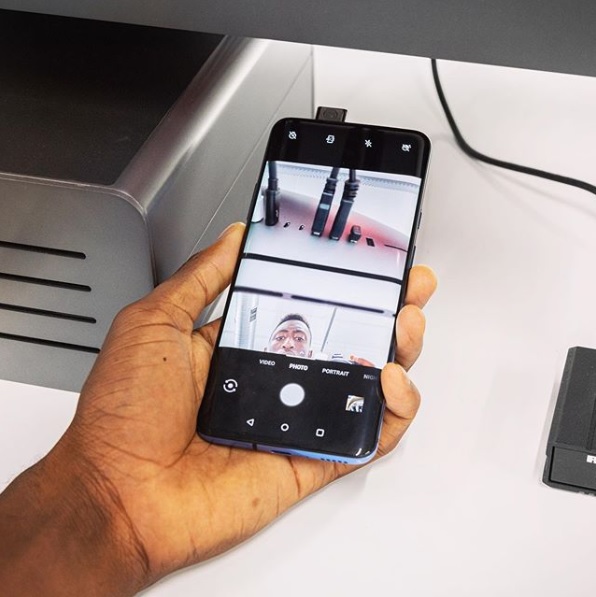
To avoid all the scenarios mentioned earlier, here is the latest trick for you. One of the tech reporters, Marques Brownlee, has a wonderful method to solve this problem. The trick is to use your phone’s selfie camera in such a way that you can easily see all the ports at the back.
What you have to do?
The trick is straightforward and you need no extra accessories for doing it. All you are required to do is open the selfie camera of your smartphone.
Step 1: Open your phone’s camera in the selfie mode.
Step 2: Slide your phone’s camera under your monitor, TV, or computer. (Behind whatever device you have to see)
Step 3: Now, you can see the backside of your monitor on the screen of your smartphone.
Step 4: Check the location of the port and your hand on your phone’s screen and plug the cable at the place.
As you see, there is no complicated procedure, and you are making a digital hand mirror out of your selfie camera.
This simple trick makes it possible to plug something in (or pull something out) without wiggling back in there or having to move everything around your desk.